Bauelement: Unterschied zwischen den Versionen
K (Yaromid verschob die Seite Baumaterialien nach Bauelement: Terminologie + Singular) |
|||
| (29 dazwischenliegende Versionen desselben Benutzers werden nicht angezeigt) | |||
| Zeile 11: | Zeile 11: | ||
Mit der Spitzhacke kann bereits Erde, Stein, Kies und auch Holz abgebaut werden. Die Möglichkeiten diese in die verschiedenen Baumaterialien umzuwandeln sind in der Version 0.2.1 jedoch noch sehr eingeschränkt. Es ist, auch im Überlebensmodus nicht notwendig, Rohmaterial wie Stein oder Holz bei sich zu tragen. Das Anklicken der [[Werkbank]] und die Auswahl des Baumaterials, sowie der Form reichen aus um einen Stapel des Materials ins [[Inventar]] zu bekommen. | Mit der Spitzhacke kann bereits Erde, Stein, Kies und auch Holz abgebaut werden. Die Möglichkeiten diese in die verschiedenen Baumaterialien umzuwandeln sind in der Version 0.2.1 jedoch noch sehr eingeschränkt. Es ist, auch im Überlebensmodus nicht notwendig, Rohmaterial wie Stein oder Holz bei sich zu tragen. Das Anklicken der [[Werkbank]] und die Auswahl des Baumaterials, sowie der Form reichen aus um einen Stapel des Materials ins [[Inventar]] zu bekommen. | ||
== Formen der Bauelemente == | |||
Um das Portfolio der Bauelemente zu erweitern wurde mit Patch 0.2 mehrere verschiedene Formen in das Spiel integriert. Diese können beim Herstellen des Bauelements ausgewählt werden. | |||
Zur Verfügung stehen u.a. Zylinder, verschiedene Treppen-Varianten und auch eine Kugel oder hohler Zylinder. | |||
<br> Siehe auch: [[Konsole#Edit|Konsolenbefehle - Baubefehl edit shape]] | |||
=== Blockform === | |||
Tabelle mit Bauelementen / Blockformen | |||
{| class="wikitable sortable" style="margin-left:1px;" | |||
! Bild !! Blockform !! Name !! Konsolenbefehl !! Kategorie !! Formtyp !! meshpath | |||
|- | |||
| <div style="display:flex">[[Datei:Shape_arc_512.png|70px]] [[Datei:Shape_arc_642.png|70px]]</div> | |||
| arc || Bogen || [[Konsole#Edit|Baubefehl edit]]:<br/> <code>edit shape arc</code> || Basis || Slope || Models/Constructions/Blocks/arc.asset | |||
|- | |||
| <div style="display:flex">[[Datei:Shape_arccorner_512.png|70px]] [[Datei:Shape_arccorner_642.png|70px]]</div> | |||
| arccorner || Bogenecke || [[Konsole#Edit|Baubefehl edit]]:<br/> <code>edit shape arccorner</code> || Corners || Corner || Models/Constructions/Blocks/arccorner.asset | |||
|- | |||
| <div style="display:flex"> [[Datei:shape_arccornerinner_512.png|zentriert|75px]] [[Datei:shape_arccornerinner_642.png|zentriert|75px]] </div> | |||
| arccornerinner || Innere Bogenecke || [[Konsole#Edit|Baubefehl edit]]:<br/> <code>edit shape arccornerinner</code> || Corners || Corner || Models/Constructions/Blocks/arccornerinner.asset | |||
|- | |||
| <div style="display:flex"> [[Datei:shape_arcinverse_512.png|zentriert|75px]] </div> || arcinverse || Bogen (invertiert) || [[Konsole#Edit|Baubefehl edit]]:<br/> <code>edit shape arcinverse</code> || Basis || Slope || Models/Constructions/Blocks/arcinverse.asset | |||
|- | |||
| <div style="display:flex"> [[Datei:shape_arcinversecorner_512.png|zentriert|75px]] </div> || arcinversecorner || Bogenecke (invertiert) || [[Konsole#Edit|Baubefehl edit]]:<br/> <code>edit shape arcinversecorner</code> || Corners || Corner || Models/Constructions/Blocks/arcinversecorner.asset | |||
|- | |||
| <div style="display:flex"> [[Datei:shape_arcinversecornerhalf_512.png|zentriert|75px]] </div> || arcinversecornerhalf || Innere halbe Bogenecke (invertiert) || [[Konsole#Edit|Baubefehl edit]]:<br/> <code>edit shape arcinversecornerhalf</code> || Corners || Corner || Models/Constructions/Blocks/arcinversecornerhalf.asset | |||
|- | |||
| <div style="display:flex"> [[Datei:shape_arcinversecornerinner_512.png|zentriert|75px]] </div> || arcinversecornerinner || Innere Bogenecke (invertiert) || [[Konsole#Edit|Baubefehl edit]]:<br/> <code>edit shape arcinversecornerinner</code> || Corners || Corner || Models/Constructions/Blocks/arcinversecornerinner.asset | |||
|- | |||
| <div style="display:flex"> [[Datei:shape_block_512.png|zentriert|75px]] </div> || block || Block || [[Konsole#Edit|Baubefehl edit]]:<br/> <code>edit shape block</code> || Basis || Default || Models/Constructions/Blocks/block.asset | |||
|- | |||
| <div style="display:flex"> [[Datei:shape_cone_512.png|zentriert|75px]] </div> || cone || Kegel || [[Konsole#Edit|Baubefehl edit]]:<br/> <code>edit shape cone</code> || Basis || Special || Models/Constructions/Blocks/cone16.asset | |||
|- | |||
| <div style="display:flex"> [[Datei:shape_conehollow_512.png|zentriert|75px]] </div> || conehollow || Hohler Kegel || [[Konsole#Edit|Baubefehl edit]]:<br/> <code>edit shape conehollow</code> || Special || Special || Models/Constructions/Blocks/conehollow16.asset | |||
|- | |||
| <div style="display:flex"> [[Datei:shape_cylinder_512.png|zentriert|75px]] </div> || cylinder || Zylinder || [[Konsole#Edit|Baubefehl edit]]:<br/> <code>edit shape cylinder</code> || Basis || Special || Models/Constructions/Blocks/cylinder16.asset | |||
|- | |||
| <div style="display:flex"> [[Datei:shape_eighthsphere_512.png|zentriert|75px]] </div> || eighthsphere || Achtel Kugel || [[Konsole#Edit|Baubefehl edit]]:<br/> <code>edit shape eighthsphere</code> || Special || Special || Models/Constructions/Blocks/eightsphere32.asset | |||
|- | |||
| <div style="display:flex"> [[Datei:shape_eighthspherehollow_512.png|zentriert|75px]] </div> || eighthspherehollow || Achtel hohle Kugel || [[Konsole#Edit|Baubefehl edit]]:<br/> <code>edit shape eighthspherehollow</code> || Special || Special || Models/Constructions/Blocks/eightspherehollow32.asset | |||
|- | |||
| <div style="display:flex"> [[Datei:shape_halfcone_512.png|zentriert|75px]] </div> || halfcone || Halber Kegel || [[Konsole#Edit|Baubefehl edit]]:<br/> <code>edit shape halfcone</code> || Special || Special || Models/Constructions/Blocks/halfcone16.asset | |||
|- | |||
| <div style="display:flex"> [[Datei:shape_halfconehollow_512.png|zentriert|75px]] </div> || halfconehollow || Halber hohler Kegel || [[Konsole#Edit|Baubefehl edit]]:<br/> <code>edit shape halfconehollow</code> || Special || Special || Models/Constructions/Blocks/halfconehollow16.asset | |||
|- | |||
| <div style="display:flex"> [[Datei:shape_halfcylinder_512.png|zentriert|75px]] </div> || halfcylinder || Halber Zylinder || [[Konsole#Edit|Baubefehl edit]]:<br/> <code>edit shape halfcylinder</code> || Basis || Special || Models/Constructions/Blocks/halfcylinder16.asset | |||
|- | |||
| <div style="display:flex"> [[Datei:shape_halfsphere_512.png|zentriert|75px]] </div> || halfsphere || Halbe Kugel || [[Konsole#Edit|Baubefehl edit]]:<br/> <code>edit shape halfsphere</code> || Basis || Special || Models/Constructions/Blocks/halfsphere32.asset | |||
|- | |||
| <div style="display:flex"> [[Datei:shape_halfspherehollow_512.png|zentriert|75px]] </div> || halfspherehollow || Halbe hohle Kugel || [[Konsole#Edit|Baubefehl edit]]:<br/> <code>edit shape halfspherehollow</code> || Special || Special || Models/Constructions/Blocks/halfspherehollow32.asset | |||
|- | |||
| <div style="display:flex"> [[Datei:shape_halftorus_512.png|zentriert|75px]] </div> || halftorus || Halber Torus || [[Konsole#Edit|Baubefehl edit]]:<br/> <code>edit shape halftorus</code> || Special || Special || Models/Constructions/Blocks/halftorus16.asset | |||
|- | |||
| <div style="display:flex"> [[Datei:shape_hollowarcinverse_512.png|zentriert|75px]] </div> || hollowarcinverse || Hohler Bogen (invertiert) || [[Konsole#Edit|Baubefehl edit]]:<br/> <code>edit shape hollowarcinverse</code> || Special || Special || Models/Constructions/Blocks/hollowarcinverse32.asset | |||
|- | |||
| <div style="display:flex"> [[Datei:shape_hollowarcinversecorner_512.png|zentriert|75px]] </div> || hollowarcinversecorner || Hohle Bogenecke (invertiert) || [[Konsole#Edit|Baubefehl edit]]:<br/> <code>edit shape hollowarcinversecorner</code> || Corners || Corner || Models/Constructions/Blocks/hollowarcinversecorner32.asset | |||
|- | |||
| <div style="display:flex"> [[Datei:shape_hollowarcinversecornerinner_512.png|zentriert|75px]] </div> || hollowarcinversecornerinner || Hohle innere Bogenecke (invertiert) || [[Konsole#Edit|Baubefehl edit]]:<br/> <code>edit shape hollowarcinversecornerinner</code> || Corners || Corner || Models/Constructions/Blocks/hollowarcinversecornerinner32.asset | |||
|- | |||
| <div style="display:flex"> [[Datei:shape_hollowblock_512.png|zentriert|75px]] </div> || hollowblock || Hohler Block || [[Konsole#Edit|Baubefehl edit]]:<br/> <code>edit shape hollowblock</code> || Basis || Default || Models/Constructions/Blocks/hollowblock.asset | |||
|- | |||
| <div style="display:flex"> [[Datei:shape_hollowcylinder_512.png|zentriert|75px]] </div> || hollowcylinder || Hohler Zylinder || [[Konsole#Edit|Baubefehl edit]]:<br/> <code>edit shape hollowcylinder</code> || Basis || Special || Models/Constructions/Blocks/hollowcylinder16.asset | |||
|- | |||
| <div style="display:flex"> [[Datei:shape_hollowcylinderblock_512.png|zentriert|75px]] </div> || hollowcylinderblock || Hohler Zylinderblock || [[Konsole#Edit|Baubefehl edit]]:<br/> <code>edit shape hollowcylinderblock</code> || Basis || Default || Models/Constructions/Blocks/hollowcylinderblock.asset | |||
|- | |||
| <div style="display:flex"> [[Datei:shape_hollowcylindercorner_512.png|zentriert|75px]] </div> || hollowcylindercorner || Hohle Zylinderecke || [[Konsole#Edit|Baubefehl edit]]:<br/> <code>edit shape hollowcylindercorner</code> || Corners || Corner || Models/Constructions/Blocks/hollowcylindercorner16.asset | |||
|- | |||
| <div style="display:flex"> [[Datei:shape_hollowcylinderhalf_512.png|zentriert|75px]] </div> || hollowcylinderhalf || Halber hohler Zylinder || [[Konsole#Edit|Baubefehl edit]]:<br/> <code>edit shape hollowcylinderhalf</code> || Special || Special || Models/Constructions/Blocks/hollowcylinderhalf16.asset | |||
|- | |||
| <div style="display:flex"> [[Datei:shape_hollowcylinderquarter_512.png|zentriert|75px]] </div> || hollowcylinderquarter || Viertel hohler Zylinder || [[Konsole#Edit|Baubefehl edit]]:<br/> <code>edit shape hollowcylinderquarter</code> || Special || Special || Models/Constructions/Blocks/hollowcylinderquarter16.asset | |||
|- | |||
| <div style="display:flex"> [[Datei:shape_pane_512.png|zentriert|75px]] </div> || pane || Scheibe || [[Konsole#Edit|Baubefehl edit]]:<br/> <code>edit shape pane</code> || Panes || Pane || Models/Constructions/Panes/pane.asset | |||
|- | |||
| <div style="display:flex"> [[Datei:shape_panecircle_512.png|zentriert|75px]] </div> || panecircle || Runde Scheibe || [[Konsole#Edit|Baubefehl edit]]:<br/> <code>edit shape panecircle</code> || Panes || Pane || Models/Constructions/Panes/panecircle.asset | |||
|- | |||
| <div style="display:flex"> [[Datei:shape_panehalfcircle_512.png|zentriert|75px]] </div> || panehalfcircle || Runde Scheibe (Hälfte) || [[Konsole#Edit|Baubefehl edit]]:<br/> <code>edit shape panehalfcircle</code> || Panes || Pane || Models/Constructions/Panes/panehalfcircle.asset | |||
|- | |||
| <div style="display:flex"> [[Datei:shape_panequartercircle_512.png|zentriert|75px]] </div> || panequartercircle || Runde Scheibe (Viertel) || [[Konsole#Edit|Baubefehl edit]]:<br/> <code>edit shape panequartercircle</code> || Panes || Pane || Models/Constructions/Panes/panequartercircle.asset | |||
|- | |||
| <div style="display:flex"> [[Datei:shape_panerighttriangle_512.png|zentriert|75px]] </div> || panerighttriangle || Dreieckige Scheibe (rechtwinklig) || [[Konsole#Edit|Baubefehl edit]]:<br/> <code>edit shape panerighttriangle</code> || Panes || Pane || Models/Constructions/Panes/panerighttriangle.asset | |||
|- | |||
| <div style="display:flex"> [[Datei:shape_panetriangle_512.png|zentriert|75px]] </div> || panetriangle || Dreieckige Scheibe || [[Konsole#Edit|Baubefehl edit]]:<br/> <code>edit shape panetriangle</code> || Panes || Pane || Models/Constructions/Panes/panetriangle.asset | |||
|- | |||
| <div style="display:flex"> [[Datei:shape_pillar_512.png|zentriert|75px]] </div> || pillar || Säule || [[Konsole#Edit|Baubefehl edit]]:<br/> <code>edit shape pillar</code> || Special || Special || Models/Constructions/Blocks/pillar.asset | |||
|- | |||
| <div style="display:flex"> [[Datei:shape_pyramid_512.png|zentriert|75px]] </div> || pyramid || Pyramide || [[Konsole#Edit|Baubefehl edit]]:<br/> <code>edit shape pyramid</code> || Basis || Special || Models/Constructions/Blocks/pyramid.asset | |||
|- | |||
| <div style="display:flex"> [[Datei:shape_quartercone_512.png|zentriert|75px]] </div> || quartercone || Viertel Kegel || [[Konsole#Edit|Baubefehl edit]]:<br/> <code>edit shape quartercone</code> || Special || Special || Models/Constructions/Blocks/quartercone16.asset | |||
|- | |||
| <div style="display:flex"> [[Datei:shape_quarterconehollow_512.png|zentriert|75px]] </div> || quarterconehollow || Viertel hohler Kegel || [[Konsole#Edit|Baubefehl edit]]:<br/> <code>edit shape quarterconehollow</code> || Special || Special || Models/Constructions/Blocks/quarterconehollow16.asset | |||
|- | |||
| <div style="display:flex"> [[Datei:shape_quartercylinder_512.png|zentriert|75px]] </div> || quartercylinder || Viertel Zylinder || [[Konsole#Edit|Baubefehl edit]]:<br/> <code>edit shape quartercylinder</code> || Special || Special || Models/Constructions/Blocks/quartercylinder16.asset | |||
|- | |||
| <div style="display:flex"> [[Datei:shape_quartersphere_512.png|zentriert|75px]] </div> || quartersphere || Viertel Kugel || [[Konsole#Edit|Baubefehl edit]]:<br/> <code>edit shape quartersphere</code> || Special || Special || Models/Constructions/Blocks/quartersphere32.asset | |||
|- | |||
| <div style="display:flex"> [[Datei:shape_quarterspherehollow_512.png|zentriert|75px]] </div> || quarterspherehollow || Viertel hohle Kugel || [[Konsole#Edit|Baubefehl edit]]:<br/> <code>edit shape quarterspherehollow</code> || Special || Special || Models/Constructions/Blocks/quarterspherehollow32.asset | |||
|- | |||
| <div style="display:flex"> [[Datei:shape_ramp_512.png|zentriert|75px]] </div> || ramp || Rampe || [[Konsole#Edit|Baubefehl edit]]:<br/> <code>edit shape ramp</code> || Basis || Slope || Models/Constructions/Blocks/ramp.asset | |||
|- | |||
| <div style="display:flex"> [[Datei:shape_rampcorner_512.png|zentriert|75px]] </div> || rampcorner || Rampenecke || [[Konsole#Edit|Baubefehl edit]]:<br/> <code>edit shape rampcorner</code> || Corners || Corner || Models/Constructions/Blocks/rampcorner.asset | |||
|- | |||
| <div style="display:flex"> [[Datei:shape_rampcorner2_512.png|zentriert|75px]] </div> || rampcorner2 || Rampenecke B || [[Konsole#Edit|Baubefehl edit]]:<br/> <code>edit shape rampcorner2</code> || Corners || Corner || Models/Constructions/Blocks/rampcorner2.asset | |||
|- | |||
| <div style="display:flex"> [[Datei:shape_rampcornerhalf_512.png|zentriert|75px]] </div> || rampcornerhalf || Halbe Rampenecke || [[Konsole#Edit|Baubefehl edit]]:<br/> <code>edit shape rampcornerhalf</code> || Corners || Corner || Models/Constructions/Blocks/rampcornerhalf.asset | |||
|- | |||
| <div style="display:flex"> [[Datei:shape_rampcornerinner_512.png|zentriert|75px]] </div> || rampcornerinner || Innere Rampenecke || [[Konsole#Edit|Baubefehl edit]]:<br/> <code>edit shape rampcornerinner</code> || Corners || Corner || Models/Constructions/Blocks/rampcornerinner.asset | |||
|- | |||
| <div style="display:flex"> [[Datei:shape_roundedblock_512.png|zentriert|75px]] </div> || roundedblock || Abgerundeter Block || [[Konsole#Edit|Baubefehl edit]]:<br/> <code>edit shape roundedblock</code> || Basis || Default || Models/Constructions/Blocks/roundedblock.asset | |||
|- | |||
| <div style="display:flex"> [[Datei:shape_roundedblock2_512.png|zentriert|75px]] </div> || roundedblock2 || Abgerundeter Block (flach) || [[Konsole#Edit|Baubefehl edit]]:<br/> <code>edit shape roundedblock2</code> || Basis || Default || Models/Constructions/Blocks/roundedblock2.asset | |||
|- | |||
| <div style="display:flex"> [[Datei:shape_roundedcylinder_512.png|zentriert|75px]] </div> || roundedcylinder || Abgerundeter Zylinder || [[Konsole#Edit|Baubefehl edit]]:<br/> <code>edit shape roundedcylinder</code> || Basis || Default || Models/Constructions/Blocks/roundedcylinder16.asset | |||
|- | |||
| <div style="display:flex"> [[Datei:shape_sphere_512.png|zentriert|75px]] </div> || sphere || Kugel || [[Konsole#Edit|Baubefehl edit]]:<br/> <code>edit shape sphere</code> || Basis || Special || Models/Constructions/Blocks/sphere16.asset | |||
|- | |||
| <div style="display:flex"> [[Datei:shape_stair1_512.png|zentriert|75px]] </div> || stair1 || Treppe || [[Konsole#Edit|Baubefehl edit]]:<br/> <code>edit shape stair1</code> || Basis || Slope || Models/Constructions/Blocks/stair1.asset | |||
|- | |||
| <div style="display:flex"> [[Datei:shape_stair1corner_512.png|zentriert|75px]] </div> || stair1corner || Treppenecke || [[Konsole#Edit|Baubefehl edit]]:<br/> <code>edit shape stair1corner</code> || Corners || Corner || Models/Constructions/Blocks/stair1corner.asset | |||
|- | |||
| <div style="display:flex"> [[Datei:shape_stair1cornerinner_512.png|zentriert|75px]] </div> || stair1cornerinner || Innere Treppenecke || [[Konsole#Edit|Baubefehl edit]]:<br/> <code>edit shape stair1cornerinner</code> || Corners || Corner || Models/Constructions/Blocks/stair1cornerinner.asset | |||
|- | |||
| <div style="display:flex"> [[Datei:shape_stair2_512.png|zentriert|75px]] </div> || stair2 || Treppe (schräg) || [[Konsole#Edit|Baubefehl edit]]:<br/> <code>edit shape stair2</code> || Basis || Slope || Models/Constructions/Blocks/stair2.asset | |||
|- | |||
| <div style="display:flex"> [[Datei:shape_stair3_512.png|zentriert|75px]] </div> || stair3 || Treppe (Stufen) || [[Konsole#Edit|Baubefehl edit]]:<br/> <code>edit shape stair3</code> || Basis || Slope || Models/Constructions/Blocks/stair3.asset | |||
|- | |||
| <div style="display:flex"> [[Datei:shape_torus_512.png|zentriert|75px]] </div> || torus || Torus || [[Konsole#Edit|Baubefehl edit]]:<br/> <code>edit shape torus</code> || Special || Special || Models/Constructions/Blocks/torus16.asset | |||
|- | |||
| <div style="display:flex"> [[Datei:shape_torus2_512.png|zentriert|75px]] </div> || torus2 || Torus (innen flach) || [[Konsole#Edit|Baubefehl edit]]:<br/> <code>edit shape torus2</code> || Special || Special || Models/Constructions/Blocks/torusinnerflat16.asset | |||
|- | |||
| <div style="display:flex"> [[Datei:shape_triangle_512.png|zentriert|75px]] </div> || triangle || Dreieck || [[Konsole#Edit|Baubefehl edit]]:<br/> <code>edit shape triangle</code> || Basis || Special || Models/Constructions/Blocks/triangle.asset | |||
|- | |||
| <div style="display:flex"> [[Datei:shape_window1_512.png|zentriert|75px]] </div> || window1 || Fensterrahmen || [[Konsole#Edit|Baubefehl edit]]:<br/> <code>edit shape window1</code> || Windows || Window || Models/Constructions/Windows/window1.asset | |||
|- | |||
| <div style="display:flex"> [[Datei:shape_window10_512.png|zentriert|75px]] </div> || window10 || Fensterrahmen (rund) || [[Konsole#Edit|Baubefehl edit]]:<br/> <code>edit shape window10</code> || Windows || Window || Models/Constructions/Windows/window10b.asset | |||
|- | |||
| <div style="display:flex"> [[Datei:shape_window2_512.png|zentriert|75px]] </div> || window2 || Fensterrahmen (Sprosse) || [[Konsole#Edit|Baubefehl edit]]:<br/> <code>edit shape window2</code> || Windows || Window || Models/Constructions/Windows/window2.asset | |||
|- | |||
| <div style="display:flex"> [[Datei:shape_window3_512.png|zentriert|75px]] </div> || window3 || Fensterrahmen (Sprossen Typ A) || [[Konsole#Edit|Baubefehl edit]]:<br/> <code>edit shape window3</code> || Windows || Window || Models/Constructions/Windows/window3.asset | |||
|- | |||
| <div style="display:flex"> [[Datei:shape_window4_512.png|zentriert|75px]] </div> || window4 || Fensterrahmen (Sprossen Typ B) || [[Konsole#Edit|Baubefehl edit]]:<br/> <code>edit shape window4</code> || Windows || Window || Models/Constructions/Windows/window4.asset | |||
|- | |||
| <div style="display:flex"> [[Datei:shape_window5_512.png|zentriert|75px]] </div> || window5 || Fensterrahmen (Sprossen Typ C) || [[Konsole#Edit|Baubefehl edit]]:<br/> <code>edit shape window5</code> || Windows || Window || Models/Constructions/Windows/window5.asset | |||
|- | |||
| <div style="display:flex"> [[Datei:shape_window6_512.png|zentriert|75px]] </div> || window6 || Fensterrahmen (Sprossen Typ D) || [[Konsole#Edit|Baubefehl edit]]:<br/> <code>edit shape window6</code> || Windows || Window || Models/Constructions/Windows/window6.asset | |||
|- | |||
| <div style="display:flex"> [[Datei:shape_window7_512.png|zentriert|75px]] </div> || window7 || Fensterrahmen (dreieckig) || [[Konsole#Edit|Baubefehl edit]]:<br/> <code>edit shape window7</code> || Windows || Window || Models/Constructions/Windows/window7.asset | |||
|- | |||
| <div style="display:flex"> [[Datei:shape_window8_512.png|zentriert|75px]] </div> || window8 || Fensterrahmen (rechtwinklig) || [[Konsole#Edit|Baubefehl edit]]:<br/> <code>edit shape window8</code> || Windows || Window || Models/Constructions/Windows/window8.asset | |||
|- | |||
| <div style="display:flex"> [[Datei:shape_window9_512.png|zentriert|75px]] </div> || window9 || Fensterrahmen (abgerundet) || [[Konsole#Edit|Baubefehl edit]]:<br/> <code>edit shape window9</code> || Windows || Window || Models/Constructions/Windows/window9.asset | |||
|} | |||
== Relevante Konsolenbefehle == | |||
{| class="wikitable sortable" style="margin-left:1px;" | |||
! Befehl | |||
! Parameter | |||
! Beschreibung !! Description<br/>(orginal) | |||
|- | |||
| blocks | |||
| - | |||
| Öffnet eine Blockauswahl, in der Sie eine Blockform und -textur auswählen können. | |||
| Brings up a block selection where you can select a block shape and texture | |||
|- | |||
| edit | |||
| <action> <values...> <br/>(supported actions: texture, color, shape, resize, setsize, rotate, setrotation, move, texturescale, flag) | |||
| Ändert das Element in der Welt, das Sie gerade betrachten. | |||
z.B.: | |||
*<code>edit move 1 2 0.05</code> | |||
*<code>edit shape cylinder</code> | |||
*<code>edit texture 200</code> | |||
| Modifies the element in the world you're currently looking at | |||
|- | |||
| pnb | |||
| - | |||
| Öffnet eine Blockauswahl, in der Sie eine Blockform und -textur auswählen können. | |||
| Brings up a block selection where you can select a block shape and texture | |||
|- | |||
| renderconstruction | |||
| <shape> [texture] [resolution] | |||
| Erstellt Icons für ein bestimmtes Bauelement mit allen Texturen und speichert sie im [[Screenshots]]-Ordner. | |||
z.B.: | |||
*<code>renderconstruction arccorner</code> | |||
*<code>renderconstruction block</code> | |||
| Creates icons for a particular construction element with a texture (or all textures) and stores them in the Screenshots folder | |||
|- | |||
| renderconstructions | |||
| [texture] [resolution] | |||
| Erstellt Icons für alle Bauelemente und speichert sie im Screenshots-Ordner | |||
| Creates icons for a all construction elements with a texture (or all textures) and stores them in the Screenshots folder | |||
|} | |||
Siehe auch [[Konsole#Baubefehle|Konsolenbefehle: Baubefehle]] | |||
== Bildergalerie == | |||
<gallery mode=packed> | |||
Datei:Craftingmenu_Bauen.jpg|Craftingmenu - Bauen<br/> (R.W. Version 0.6.5) | |||
Datei:Formen.PNG|Craftingmenu - Formen beim bauen | |||
Datei:Inventar_RMaus_Form.jpg|Inventar - rechte Maustaste -> Form ändern | |||
Datei:Blockform_Auswahl.jpg|Form ändern -> Wähle eine Blockform | |||
</gallery> | |||
== Siehe auch == | |||
* [[Baumechaniken]] | |||
* [[Steuerung]] | |||
* [[Objekt]] | |||
* [[Konsole|Konsole und Konsolenbefehle]] | |||
* [[Konsole#Baubefehle|Konsolenbefehle: Baubefehle]] | |||
Aktuelle Version vom 17. Juni 2026, 13:43 Uhr

Rising World bietet eine Vielzahl an verschiedenen Baumaterialien. Bereits zuvor in der Java-Version waren verschiedene Holzarten, Steintypen, Metalle und verarbeitete Materialien, wie z. B. Beton, Fliesen, usw., im Spiel enthalten.
Die Unity-Version hat die meisten dieser Materialien übernommen und noch einige hinzugefügt. Zu jeder Materialart sind mehrere verschiedene Texturen verfügbar. Bei Holz und Stein gibt es mehrere natürlich vorkommende Variationen, jedoch auch bereits verarbeitet aussehende Texturen wie z. B. Holzbretter oder Steinmauern.
Die Unity-Engine machte es schlussendlich auch möglich, die Texturen der Baumaterialien realistischer aussehen zu lassen. Beispielsweise reflektiert Marmor das Licht und auch die Goldtextur hat einen passenden Glanz.

Das „leuchtende Material“ ist mit Version 0.2.1 noch ein Platzhalter. Der Block kann hergestellt werden, jedoch wird kein Licht abgegeben. In der Demoversion aus Dezember 2021 konnte man schon einen Ausblick darauf haben, wie diese Blöcke einmal aussehen werden.
Mit der Spitzhacke kann bereits Erde, Stein, Kies und auch Holz abgebaut werden. Die Möglichkeiten diese in die verschiedenen Baumaterialien umzuwandeln sind in der Version 0.2.1 jedoch noch sehr eingeschränkt. Es ist, auch im Überlebensmodus nicht notwendig, Rohmaterial wie Stein oder Holz bei sich zu tragen. Das Anklicken der Werkbank und die Auswahl des Baumaterials, sowie der Form reichen aus um einen Stapel des Materials ins Inventar zu bekommen.
Formen der Bauelemente
Um das Portfolio der Bauelemente zu erweitern wurde mit Patch 0.2 mehrere verschiedene Formen in das Spiel integriert. Diese können beim Herstellen des Bauelements ausgewählt werden.
Zur Verfügung stehen u.a. Zylinder, verschiedene Treppen-Varianten und auch eine Kugel oder hohler Zylinder.
Siehe auch: Konsolenbefehle - Baubefehl edit shape
Blockform
Tabelle mit Bauelementen / Blockformen
| Bild | Blockform | Name | Konsolenbefehl | Kategorie | Formtyp | meshpath |
|---|---|---|---|---|---|---|
  |
arc | Bogen | Baubefehl edit:edit shape arc |
Basis | Slope | Models/Constructions/Blocks/arc.asset |
  |
arccorner | Bogenecke | Baubefehl edit:edit shape arccorner |
Corners | Corner | Models/Constructions/Blocks/arccorner.asset |
  |
arccornerinner | Innere Bogenecke | Baubefehl edit:edit shape arccornerinner |
Corners | Corner | Models/Constructions/Blocks/arccornerinner.asset |
 |
arcinverse | Bogen (invertiert) | Baubefehl edit:edit shape arcinverse |
Basis | Slope | Models/Constructions/Blocks/arcinverse.asset |
 |
arcinversecorner | Bogenecke (invertiert) | Baubefehl edit:edit shape arcinversecorner |
Corners | Corner | Models/Constructions/Blocks/arcinversecorner.asset |
 |
arcinversecornerhalf | Innere halbe Bogenecke (invertiert) | Baubefehl edit:edit shape arcinversecornerhalf |
Corners | Corner | Models/Constructions/Blocks/arcinversecornerhalf.asset |
 |
arcinversecornerinner | Innere Bogenecke (invertiert) | Baubefehl edit:edit shape arcinversecornerinner |
Corners | Corner | Models/Constructions/Blocks/arcinversecornerinner.asset |
 |
block | Block | Baubefehl edit:edit shape block |
Basis | Default | Models/Constructions/Blocks/block.asset |
 |
cone | Kegel | Baubefehl edit:edit shape cone |
Basis | Special | Models/Constructions/Blocks/cone16.asset |
 |
conehollow | Hohler Kegel | Baubefehl edit:edit shape conehollow |
Special | Special | Models/Constructions/Blocks/conehollow16.asset |
 |
cylinder | Zylinder | Baubefehl edit:edit shape cylinder |
Basis | Special | Models/Constructions/Blocks/cylinder16.asset |
 |
eighthsphere | Achtel Kugel | Baubefehl edit:edit shape eighthsphere |
Special | Special | Models/Constructions/Blocks/eightsphere32.asset |
 |
eighthspherehollow | Achtel hohle Kugel | Baubefehl edit:edit shape eighthspherehollow |
Special | Special | Models/Constructions/Blocks/eightspherehollow32.asset |
 |
halfcone | Halber Kegel | Baubefehl edit:edit shape halfcone |
Special | Special | Models/Constructions/Blocks/halfcone16.asset |
 |
halfconehollow | Halber hohler Kegel | Baubefehl edit:edit shape halfconehollow |
Special | Special | Models/Constructions/Blocks/halfconehollow16.asset |
 |
halfcylinder | Halber Zylinder | Baubefehl edit:edit shape halfcylinder |
Basis | Special | Models/Constructions/Blocks/halfcylinder16.asset |
 |
halfsphere | Halbe Kugel | Baubefehl edit:edit shape halfsphere |
Basis | Special | Models/Constructions/Blocks/halfsphere32.asset |
 |
halfspherehollow | Halbe hohle Kugel | Baubefehl edit:edit shape halfspherehollow |
Special | Special | Models/Constructions/Blocks/halfspherehollow32.asset |
 |
halftorus | Halber Torus | Baubefehl edit:edit shape halftorus |
Special | Special | Models/Constructions/Blocks/halftorus16.asset |
 |
hollowarcinverse | Hohler Bogen (invertiert) | Baubefehl edit:edit shape hollowarcinverse |
Special | Special | Models/Constructions/Blocks/hollowarcinverse32.asset |
 |
hollowarcinversecorner | Hohle Bogenecke (invertiert) | Baubefehl edit:edit shape hollowarcinversecorner |
Corners | Corner | Models/Constructions/Blocks/hollowarcinversecorner32.asset |
 |
hollowarcinversecornerinner | Hohle innere Bogenecke (invertiert) | Baubefehl edit:edit shape hollowarcinversecornerinner |
Corners | Corner | Models/Constructions/Blocks/hollowarcinversecornerinner32.asset |
 |
hollowblock | Hohler Block | Baubefehl edit:edit shape hollowblock |
Basis | Default | Models/Constructions/Blocks/hollowblock.asset |
 |
hollowcylinder | Hohler Zylinder | Baubefehl edit:edit shape hollowcylinder |
Basis | Special | Models/Constructions/Blocks/hollowcylinder16.asset |
 |
hollowcylinderblock | Hohler Zylinderblock | Baubefehl edit:edit shape hollowcylinderblock |
Basis | Default | Models/Constructions/Blocks/hollowcylinderblock.asset |
 |
hollowcylindercorner | Hohle Zylinderecke | Baubefehl edit:edit shape hollowcylindercorner |
Corners | Corner | Models/Constructions/Blocks/hollowcylindercorner16.asset |
 |
hollowcylinderhalf | Halber hohler Zylinder | Baubefehl edit:edit shape hollowcylinderhalf |
Special | Special | Models/Constructions/Blocks/hollowcylinderhalf16.asset |
 |
hollowcylinderquarter | Viertel hohler Zylinder | Baubefehl edit:edit shape hollowcylinderquarter |
Special | Special | Models/Constructions/Blocks/hollowcylinderquarter16.asset |
 |
pane | Scheibe | Baubefehl edit:edit shape pane |
Panes | Pane | Models/Constructions/Panes/pane.asset |
 |
panecircle | Runde Scheibe | Baubefehl edit:edit shape panecircle |
Panes | Pane | Models/Constructions/Panes/panecircle.asset |
 |
panehalfcircle | Runde Scheibe (Hälfte) | Baubefehl edit:edit shape panehalfcircle |
Panes | Pane | Models/Constructions/Panes/panehalfcircle.asset |
 |
panequartercircle | Runde Scheibe (Viertel) | Baubefehl edit:edit shape panequartercircle |
Panes | Pane | Models/Constructions/Panes/panequartercircle.asset |
 |
panerighttriangle | Dreieckige Scheibe (rechtwinklig) | Baubefehl edit:edit shape panerighttriangle |
Panes | Pane | Models/Constructions/Panes/panerighttriangle.asset |
 |
panetriangle | Dreieckige Scheibe | Baubefehl edit:edit shape panetriangle |
Panes | Pane | Models/Constructions/Panes/panetriangle.asset |
 |
pillar | Säule | Baubefehl edit:edit shape pillar |
Special | Special | Models/Constructions/Blocks/pillar.asset |
 |
pyramid | Pyramide | Baubefehl edit:edit shape pyramid |
Basis | Special | Models/Constructions/Blocks/pyramid.asset |
 |
quartercone | Viertel Kegel | Baubefehl edit:edit shape quartercone |
Special | Special | Models/Constructions/Blocks/quartercone16.asset |
 |
quarterconehollow | Viertel hohler Kegel | Baubefehl edit:edit shape quarterconehollow |
Special | Special | Models/Constructions/Blocks/quarterconehollow16.asset |
 |
quartercylinder | Viertel Zylinder | Baubefehl edit:edit shape quartercylinder |
Special | Special | Models/Constructions/Blocks/quartercylinder16.asset |
 |
quartersphere | Viertel Kugel | Baubefehl edit:edit shape quartersphere |
Special | Special | Models/Constructions/Blocks/quartersphere32.asset |
 |
quarterspherehollow | Viertel hohle Kugel | Baubefehl edit:edit shape quarterspherehollow |
Special | Special | Models/Constructions/Blocks/quarterspherehollow32.asset |
 |
ramp | Rampe | Baubefehl edit:edit shape ramp |
Basis | Slope | Models/Constructions/Blocks/ramp.asset |
 |
rampcorner | Rampenecke | Baubefehl edit:edit shape rampcorner |
Corners | Corner | Models/Constructions/Blocks/rampcorner.asset |
 |
rampcorner2 | Rampenecke B | Baubefehl edit:edit shape rampcorner2 |
Corners | Corner | Models/Constructions/Blocks/rampcorner2.asset |
 |
rampcornerhalf | Halbe Rampenecke | Baubefehl edit:edit shape rampcornerhalf |
Corners | Corner | Models/Constructions/Blocks/rampcornerhalf.asset |
 |
rampcornerinner | Innere Rampenecke | Baubefehl edit:edit shape rampcornerinner |
Corners | Corner | Models/Constructions/Blocks/rampcornerinner.asset |
 |
roundedblock | Abgerundeter Block | Baubefehl edit:edit shape roundedblock |
Basis | Default | Models/Constructions/Blocks/roundedblock.asset |
 |
roundedblock2 | Abgerundeter Block (flach) | Baubefehl edit:edit shape roundedblock2 |
Basis | Default | Models/Constructions/Blocks/roundedblock2.asset |
 |
roundedcylinder | Abgerundeter Zylinder | Baubefehl edit:edit shape roundedcylinder |
Basis | Default | Models/Constructions/Blocks/roundedcylinder16.asset |
 |
sphere | Kugel | Baubefehl edit:edit shape sphere |
Basis | Special | Models/Constructions/Blocks/sphere16.asset |
 |
stair1 | Treppe | Baubefehl edit:edit shape stair1 |
Basis | Slope | Models/Constructions/Blocks/stair1.asset |
 |
stair1corner | Treppenecke | Baubefehl edit:edit shape stair1corner |
Corners | Corner | Models/Constructions/Blocks/stair1corner.asset |
 |
stair1cornerinner | Innere Treppenecke | Baubefehl edit:edit shape stair1cornerinner |
Corners | Corner | Models/Constructions/Blocks/stair1cornerinner.asset |
 |
stair2 | Treppe (schräg) | Baubefehl edit:edit shape stair2 |
Basis | Slope | Models/Constructions/Blocks/stair2.asset |
 |
stair3 | Treppe (Stufen) | Baubefehl edit:edit shape stair3 |
Basis | Slope | Models/Constructions/Blocks/stair3.asset |
 |
torus | Torus | Baubefehl edit:edit shape torus |
Special | Special | Models/Constructions/Blocks/torus16.asset |
 |
torus2 | Torus (innen flach) | Baubefehl edit:edit shape torus2 |
Special | Special | Models/Constructions/Blocks/torusinnerflat16.asset |
 |
triangle | Dreieck | Baubefehl edit:edit shape triangle |
Basis | Special | Models/Constructions/Blocks/triangle.asset |
 |
window1 | Fensterrahmen | Baubefehl edit:edit shape window1 |
Windows | Window | Models/Constructions/Windows/window1.asset |
 |
window10 | Fensterrahmen (rund) | Baubefehl edit:edit shape window10 |
Windows | Window | Models/Constructions/Windows/window10b.asset |
 |
window2 | Fensterrahmen (Sprosse) | Baubefehl edit:edit shape window2 |
Windows | Window | Models/Constructions/Windows/window2.asset |
 |
window3 | Fensterrahmen (Sprossen Typ A) | Baubefehl edit:edit shape window3 |
Windows | Window | Models/Constructions/Windows/window3.asset |
 |
window4 | Fensterrahmen (Sprossen Typ B) | Baubefehl edit:edit shape window4 |
Windows | Window | Models/Constructions/Windows/window4.asset |
 |
window5 | Fensterrahmen (Sprossen Typ C) | Baubefehl edit:edit shape window5 |
Windows | Window | Models/Constructions/Windows/window5.asset |
 |
window6 | Fensterrahmen (Sprossen Typ D) | Baubefehl edit:edit shape window6 |
Windows | Window | Models/Constructions/Windows/window6.asset |
 |
window7 | Fensterrahmen (dreieckig) | Baubefehl edit:edit shape window7 |
Windows | Window | Models/Constructions/Windows/window7.asset |
 |
window8 | Fensterrahmen (rechtwinklig) | Baubefehl edit:edit shape window8 |
Windows | Window | Models/Constructions/Windows/window8.asset |
 |
window9 | Fensterrahmen (abgerundet) | Baubefehl edit:edit shape window9 |
Windows | Window | Models/Constructions/Windows/window9.asset |
Relevante Konsolenbefehle
| Befehl | Parameter | Beschreibung | Description (orginal) |
|---|---|---|---|
| blocks | - | Öffnet eine Blockauswahl, in der Sie eine Blockform und -textur auswählen können. | Brings up a block selection where you can select a block shape and texture |
| edit | <action> <values...> (supported actions: texture, color, shape, resize, setsize, rotate, setrotation, move, texturescale, flag) |
Ändert das Element in der Welt, das Sie gerade betrachten.
z.B.: * |
Modifies the element in the world you're currently looking at |
| pnb | - | Öffnet eine Blockauswahl, in der Sie eine Blockform und -textur auswählen können. | Brings up a block selection where you can select a block shape and texture |
| renderconstruction | <shape> [texture] [resolution] | Erstellt Icons für ein bestimmtes Bauelement mit allen Texturen und speichert sie im Screenshots-Ordner.
z.B.: * |
Creates icons for a particular construction element with a texture (or all textures) and stores them in the Screenshots folder |
| renderconstructions | [texture] [resolution] | Erstellt Icons für alle Bauelemente und speichert sie im Screenshots-Ordner | Creates icons for a all construction elements with a texture (or all textures) and stores them in the Screenshots folder |
Siehe auch Konsolenbefehle: Baubefehle
Bildergalerie
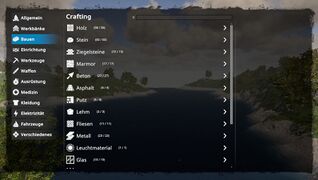
Craftingmenu - Bauen
(R.W. Version 0.6.5)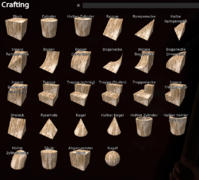
Craftingmenu - Formen beim bauen
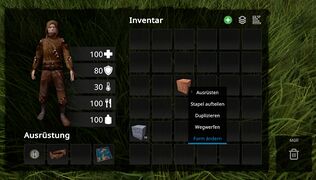
Inventar - rechte Maustaste -> Form ändern
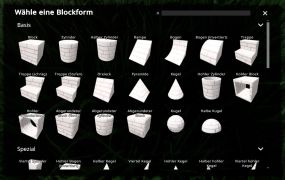
Form ändern -> Wähle eine Blockform


